Home
Home is your monthly snapshot. It shows, for the selected month:
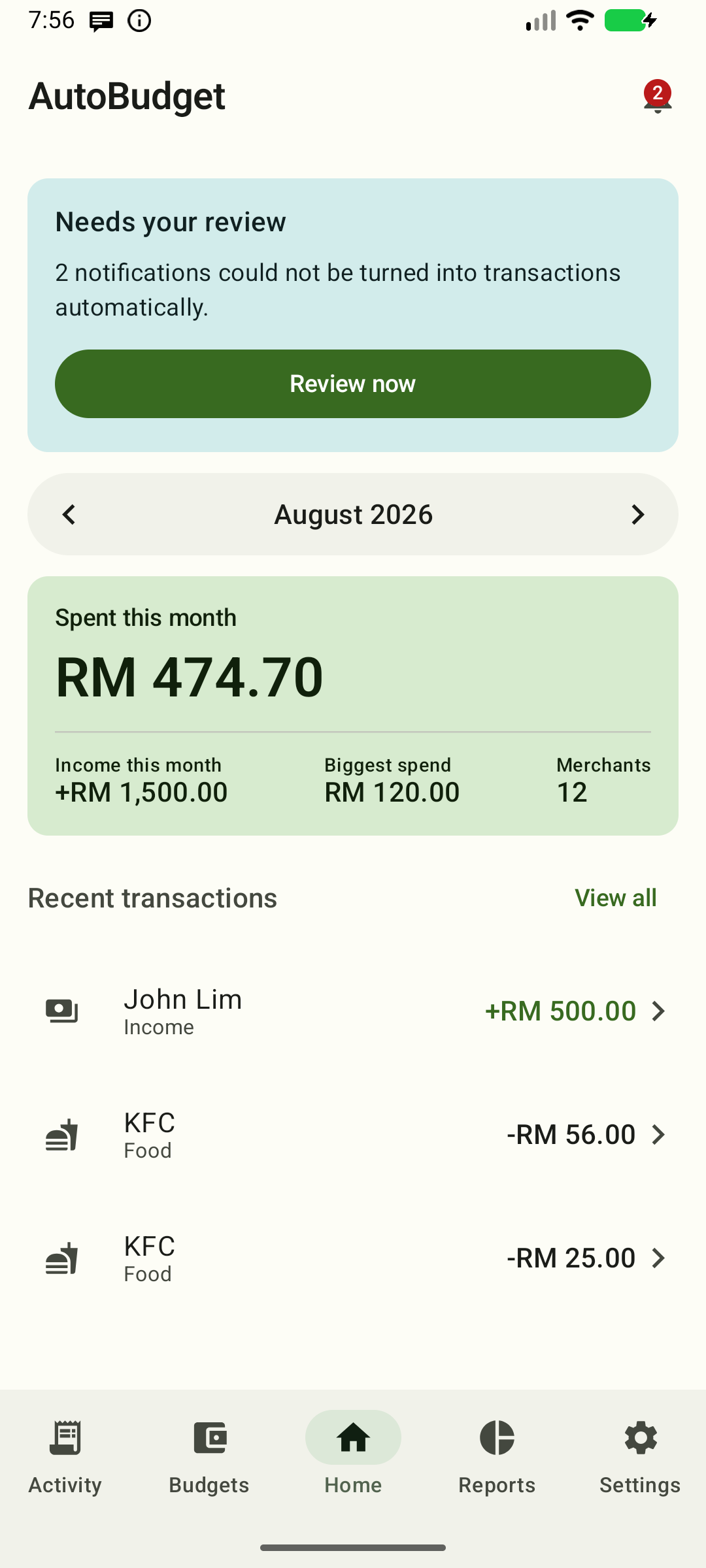
The screenshot predates the W12 large-text action inset; the current layout keeps View all clear of the floating add button at every supported width.
On wide windows, the monthly summary and review status sit beside recent transactions, so you can see both at once. The dashboard stays centered on larger displays. Scroll to reach the rest of either column; resizing keeps your selected month. On phones, Home keeps a single column, with the summary and at least the first two recent transactions fitting above the bottom navigation. The order is the same at both widths: capture status, the review strip, then the hero. When a capture-status notice is shown it is the first element above the summary, so it takes the space one of those rows would use — scroll for the rest.
Navigation
Use Home, Activity, Budgets, Reports, and Settings to switch sections; Home is first and Settings is last. All five stay on one bottom row; if the full destination names do not fit a narrow window or a large text size, the row scrolls sideways and a faded edge hints that more destinations are off-screen — nothing is abbreviated or hidden in a menu. The selected destination has a filled icon and tonal pill; the others use outlined icons. Wider windows use a navigation rail on the left.
Hero card
The hero is the one full-bleed emphasis card in the app — a forest-green Warm ledger surface behind Spent this month (ADR-0069, ADR-0079):
- Spent this month — the big Newsreader headline number: total of completed expenses. It uses tabular figures, so digits keep their columns.
- Income this month — total of completed income (prefixed
+). - Biggest spend — the single largest expense this month.
- Merchants — count of distinct merchants you paid.
When every budget limit converts to your base currency, the hero also shows a
budget pulse: 40% of RM 1,200.00 budget, a progress bar and the exact
remaining or over by amount. The percentage is your real uncapped usage;
the bar stops at full. If no limit is configured for the month, the hero shows
neither a budget pulse nor a budget warning — there is no budget to be
unavailable. If a configured limit cannot be converted (or a spend makes the
shared summary incomplete), the pulse is left out and the hero says the budget
is unavailable rather than showing a partial percentage. A missing exchange
rate that only affects spending keeps its own footnote; when no limit is
configured it is never reported as a budget error.
The three statistics below Spent stay in one row when their full words and amounts fit, and reflow to two or one column as text size grows or the available width shrinks — so every digit remains visible and no word breaks in the middle. A single amount wider than the whole card still wraps inside that one full-width cell without losing a character. Scroll down to reach recent transactions below the card.
Amounts in foreign currencies are converted to your base currency with your exchange rates; rows without a rate are left out of the totals and called out in a footnote under the card. If an amount cannot be represented in your display currency the footnote says it is outside the supported range, instead of pointing you at exchange rates.
Month selector
The month control sits in Home's top app bar, so you can change the visible
month without scrolling back. Use the ‹ / › arrows. Home, Activity, Budgets,
and Reports each have their own month selector. The label is the Warm ledger
period face; when you change month the label and the month's figures fade to the
new month together, so a month is never shown beside another month's totals; a
quick run of taps still settles on the month you last landed on, with its
results.
Review queue strip
When the app couldn't turn some notifications into transactions, one compact row appears near the top with the pending count, a bell, a short explanation and a single Review action. It never expands and there is no separate bell icon: tap Review to open the review queue directly. The row disappears when nothing needs review. It uses a quiet grouping surface, so it is noticeable without competing with the spending hero; the monthly total stays the one strong card. The review strip sits above the hero at both narrow and wide widths.
Adding a transaction
Tap the + button above the bottom bar to open the manual editor. It is available in every state, including when recent transactions are already listed; the empty state also keeps its Add transaction button. Reports and Settings have no add button.
Recent transactions
The last 6 transactions of the month, newest first. Each row keeps the full signed amount readable: when a narrow window or large text would make the merchant and amount collide, the amount moves below the merchant instead of being clipped or shortened. Tap a row to edit it. View all opens the full Activity list for the month selected on Home, across all categories and directions. At large text it moves under the Recent transactions title, and in every case it keeps clear of the + button so the action stays fully tappable. Back returns to that same Home month.
Capture status
Home reflects what you configured:
- Manual tracking (no bank apps tracked): a neutral note reminds you that automatic capture is off and that you can set up bank apps in Settings whenever you like. Nothing is broken, and no permission is requested.
- Automatic capture configured and active: one quiet line with a green dot says capture is active and names up to two tracked apps; it never competes with the hero or the review strip.
- Configured but notification access is off: a warning says automatic capture needs attention. Tap Turn on to open the system notification-access settings, then switch AutoBudget on. Without access, new bank alerts are not captured — you can still add every transaction by hand.
Home re-checks the status when you return from Settings or Android's notification-access screen, and when the tracked bank apps change. When a warning or manual-only note is shown, it is the first element in the summary, above the hero.
Empty state
Before your first transaction, Home shows "No transactions yet" with guidance to use the + action above the bottom bar, or to turn on notification access in Settings. Use it to log a payment by hand; captured alerts appear automatically once notification access is on.
What counts as "spent"?
Only completed expenses count toward Spent, Income, Biggest spend, and Merchants. Failed, pending, and reversed transactions are stored but hidden by default — see Activity — hidden items.