Review Queue
The review queue holds notifications the app could not turn into transactions automatically. Open it from Home's single Review strip (the compact row with the pending count and one Review action).
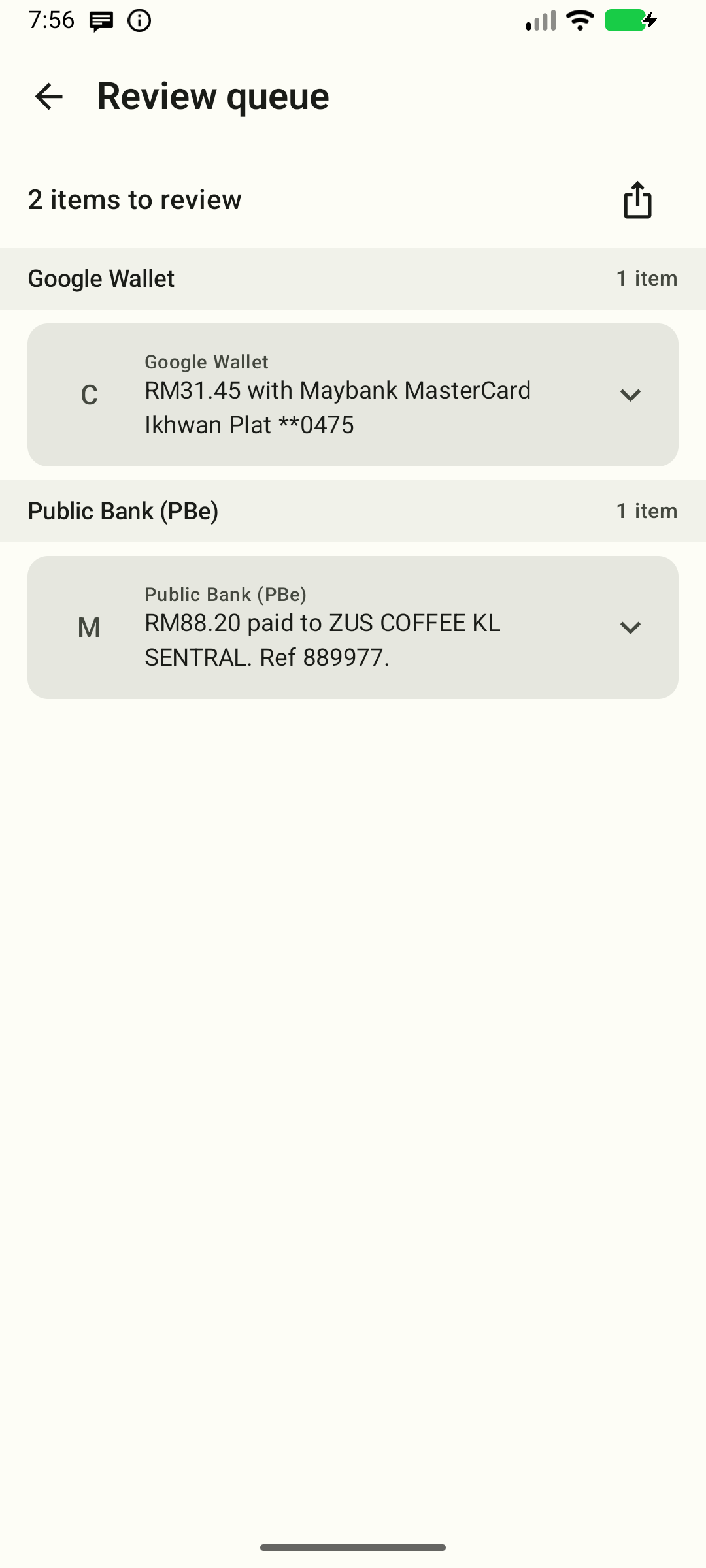
These documentation captures use a debug build with the deterministic demo seed. The share/copy diagnostics visible here are debug-only; release builds hide them (see below).
Why do notifications land here?
| Reason | What you see |
|---|---|
| The app could not create a transaction; the exact failure reason was not saved | expanded card says “The failure reason was not recorded.” |
| The bank/OS masked the content (placeholder text like "Content hidden") | row marked “Hidden notification details — review manually”; expand for guidance to check the bank app |
Promo, OTP, and verification spam are filtered out and never appear here. Notifications without any amount or money-movement wording are dropped silently rather than queued.
Actions per item
Items are grouped by their source app under sticky headers that show a per- app count. Each card leads with a 40 dp filled source badge: friendly label initials for known apps (for example, GW for Google Wallet and PB for Public Bank), or the full package and ? for unknown sources. The detected amount metadata (when shown) sits below the source identity, then the notification preview starts collapsed as a compact two-line summary — tap it to expand the full notification text and an explanation. The reason line (masked, or an honest unknown reason) and the expand/collapse chevron stay visible while collapsed. Expanding a card never adds a warning fill; only hidden or unrecorded details are called out. Cards animate in and out, and a source header leaves with its last card.
A card labels money only when the notification has one currency amount and does not mention a balance, limit or fee. That value appears under Detected in notification — it is text found in the alert, not a confirmed payment. When several possible amounts appear, or a balance/limit/fee/other non-payment amount is mentioned, the card says so and shows no single payment amount; open the card and create the transaction to check the details yourself. A value whose fraction would have to be rounded or truncated is omitted; extra zeros beyond the currency's precision are still exact. A single separator with exactly three trailing digits is read as a thousands group, as the parser documents.
- Create transaction — the primary action; opens the editor for that notification and retries the current parse rules. Only a successful match suggests an amount, currency, and merchant; otherwise amount and merchant stay blank and the currency starts at your base currency. The editor labels prefills as suggestions. Check or edit them, fill in missing details, and Save to create a transaction and remove this item from the queue. Opening the editor alone does not remove it. Hidden details must be checked in your bank app.
- Dismiss — the quieter action; removes the item from the queue without creating a transaction.
Clear the whole queue
When a burst of alerts piles up and none are real payments, tap Clear all in the queue header. A confirmation dialog appears first — confirm to dismiss every pending notification in one step. Clearing all is the same as dismissing each item individually: the notifications are marked dismissed (kept in the app, not deleted) and leave the queue. In a debug build, export anything you want the developer to see first.
Copy the raw notification (debug builds)
Debug builds show a copy hint on an expanded card. Long-press a card to copy the raw notification as JSON to your clipboard (useful for reporting a parse issue). A "copied" message confirms it. Release builds hide the hint, the long-press action and the diagnostics export, so raw notification text never reaches the clipboard there.
Export everything for the developer (debug builds)
When many notifications are stuck in a debug build, the share icon in the queue header copies every pending notification to the clipboard as a single compressed code — paste it straight into a message to the support address (see Settings → About) or a support ticket. The developer can decode it to see the raw texts and write better parse rules. A "copied" message shows how many were exported.
Best practices
- Work through the queue periodically — items stay until dismissed or converted.
- Clearing all is a soft dismiss — export anything useful for the developer first (see above), then clear.
- If a merchant's alerts keep landing here, consider adding/editing a parse rule in Settings → Categories & automation → Parse rules.